
Best AI Tools to Edit Menu Text for Prices and Layout
Updated
Compare AI menu text editors for price changes, repeated numbers, typography and print. Includes a real before-and-after example and a practical acceptance test.
For one price change in a finished menu image, a focused AI text editor is worth trying. For recurring updates, editable text layers are usually the better investment. For a printed menu, judge the downloaded file at its final size before choosing a tool.
A menu can look convincing and still be wrong. The new price might belong to the next dish, another instance of the old price might have changed, or small descriptions might have become harder to read. Choosing an editor therefore starts with the menu you have and the control you need.
This review compares five AI-assisted options: Edit Image Text Online, Canva, Photoshop, ChatGPT and Gemini. Photopea is included as a free manual alternative. We publish Edit Image Text Online. The comparison uses current official product documentation and one existing controlled menu example from our own tool; it is not a new six-tool menu benchmark. Recommendations below concern workflow fit, rather than measured accuracy rankings.
Choose a workflow for the menu you have
First check whether you still have an editable Canva design, PSD or another source project. If its text layers work, update those directly. A PDF may also contain usable text objects, although a scanned or flattened PDF may contain only an image. The extension alone does not tell you which situation you have.
When only a JPG, PNG or photograph remains, use this comparison:
| Tool | Consider it for | How you control the change | Main tradeoff |
|---|---|---|---|
| Edit Image Text Online | One short item or price replacement | Enter the existing phrase and its replacement | No manual region selector; repeated wording can be ambiguous |
| Canva Grab Text | Converting readable menu lettering into editable text | Extract text, then adjust text objects | Recognized text and reconstructed styling need checking |
| Photoshop | Rebuilding price columns or preserving a production layout | Work with selections, layers, masks and type | More setup, font matching and editing skill |
| ChatGPT Images | Trying a change through a detailed conversation | Describe the target; use a selection when available | Generative edits can extend beyond the selected area |
| Gemini Apps | Trying a menu image edit in an existing Google workflow | Upload an image and describe the replacement | Model access and limits vary; inspect the actual export |
| Photopea | A free manual correction on a manageable background | Repair the old text and add a type layer | You handle the font, alignment and background cleanup |
The product capabilities behind these choices are described in the reviews below. A useful first filter is whether the tool can identify one specific dish, especially when several items share a price.
What makes a menu edit acceptable
Treat these as acceptance conditions for your menu, rather than points that can average into a flattering score:
- The correct item changes. The price remains attached to the intended dish, size or modifier.
- The new text is exact. Check every digit, currency symbol, decimal separator and character.
- Other content survives. Neighboring dishes, prices, descriptions and logos remain correct.
- The layout still works. Baselines, price alignment, spacing and line breaks remain readable.
- The delivered file fits its destination. Check pixel dimensions for a screen and effective resolution at the intended print size.
A wrong number fails the edit even if the type looks beautiful. A correct number on the wrong row also fails. Read the result before judging its visual polish.
Edit Image Text Online for a short explicit replacement
Our menu text editor uses two fields: the wording already in the image and the replacement. This suits a small, clearly identified correction without writing a long prompt.
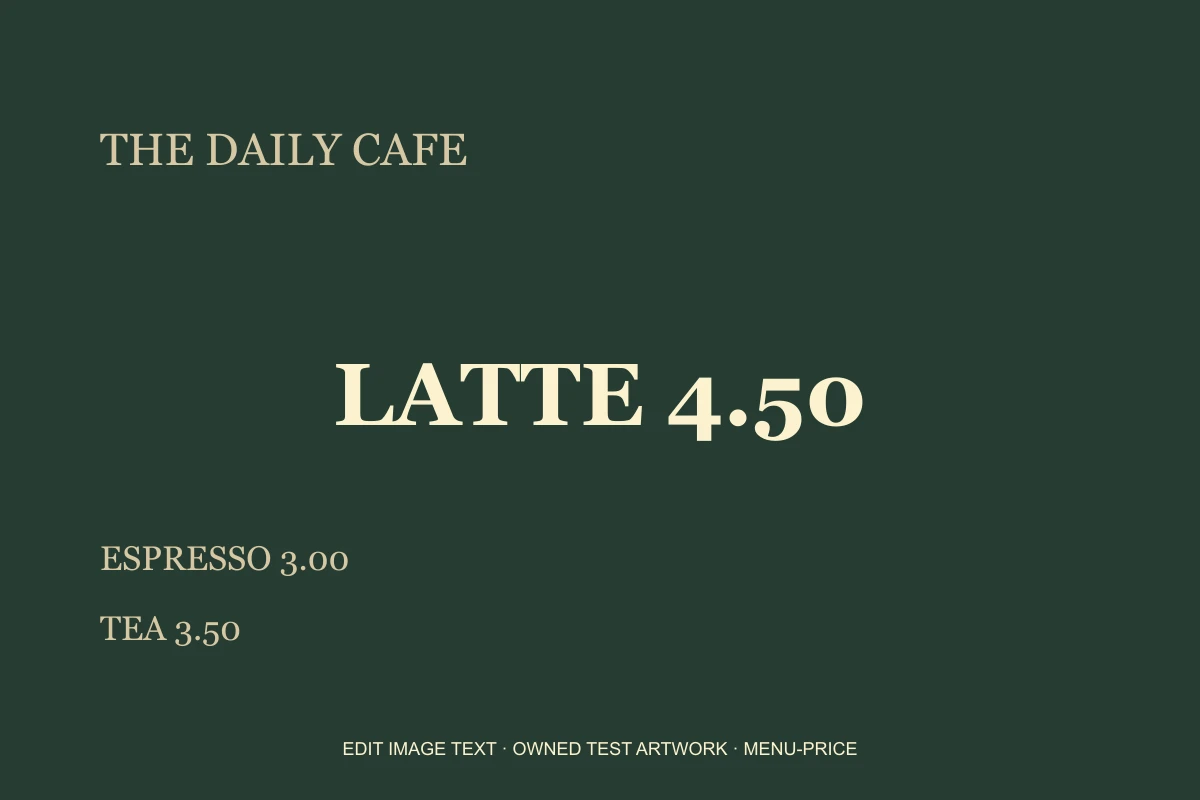
For example, entering LATTE 4.50 gives the request more context than entering only 4.50. The interface does not currently offer a manual region selector, so it is a weaker fit when identical wording appears in multiple sections. Its surrounding-image restoration also relies on a heuristic; inspect the complete result.
Choose it when you have one readable phrase to replace and can review the image afterward. Choose a layer editor instead when you need exact column positioning, many recurring updates or explicit control over one of several identical labels.
A real menu price example
Our existing controlled case changes LATTE 4.50 to LATTE 5.00 on artwork created for testing.
Before: LATTE 4.50
After: LATTE 5.00
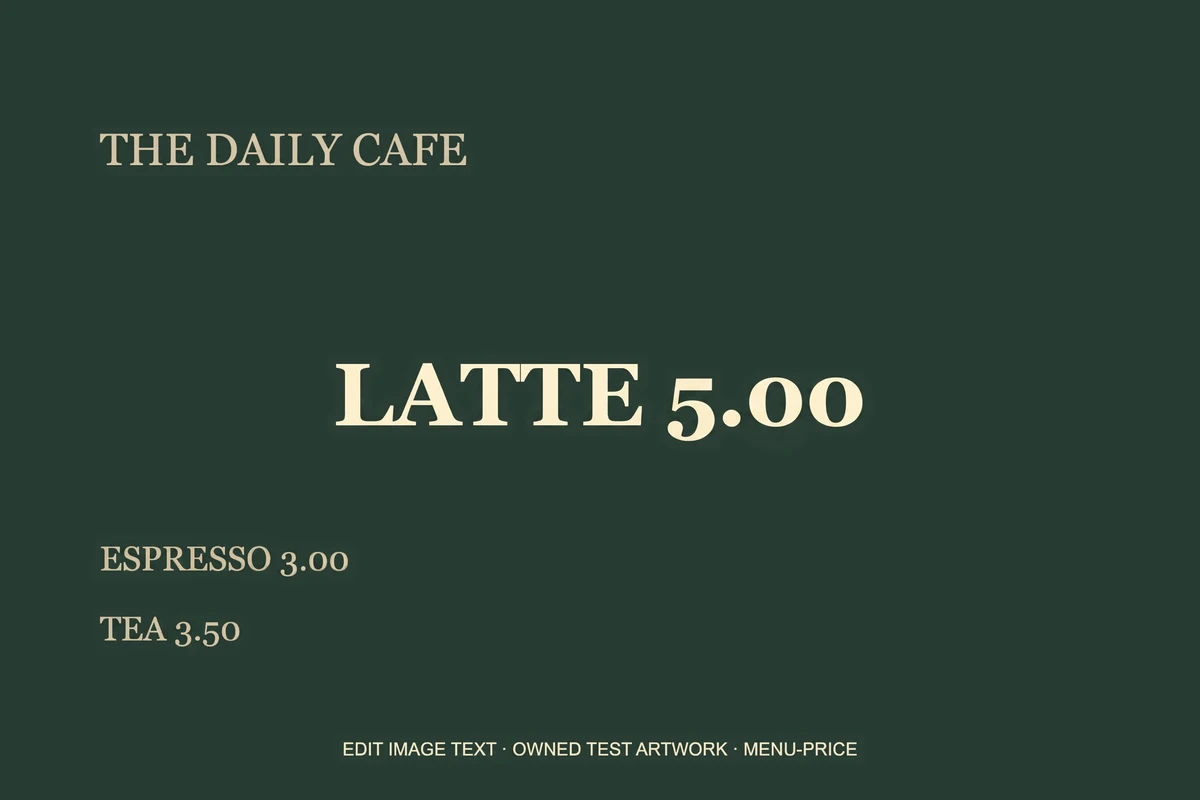
Existing controlled test on owned artwork. These 1200 × 800 previews show the original and the result after browser compositing. The raw model output is linked from the case record below.
The replacement price is readable in the displayed result. The published record reports a 1200 × 800 input, a 2528 × 1686 raw model output, and 48 seconds for this request using Nano Banana Pro at the 2K tier. These are historical observations from the controlled batch dated 3 November 2026, rather than promised dimensions or turnaround times. View the case and its original files, and the batch methodology.
The displayed after image is a web-optimized preview of the result after the editor restored surrounding areas from the original. It should not be confused with the untouched model output. The case page links that output separately.
This example supports a narrow conclusion: a short price replacement worked on this simple artwork. It does not establish performance on a dense restaurant menu, repeated prices, tiny footnotes or eight simultaneous changes. It also does not prove exact font recovery or print suitability.
Canva for text you want to keep editing
If the original menu is already a Canva design, open that project first. Repeatedly exporting it and sending the image through AI adds work that editable text objects can avoid.
For an image without its source project, Canva Grab Text converts selected lettering into an editable layer. You can then change the wording and adjust its appearance in the design editor. This makes Canva a useful candidate when today's correction should become part of a reusable menu design.
The important distinction is between extracting text from an image and recovering the original design. Inspect recognition, font substitution, spacing and background cleanup. In particular, confirm that prices have not been separated from their dishes or grouped awkwardly across columns.
Choose it when you want editable text and further layout changes. Check feature access in your account before paying; Canva's plans and AI allowances differ. For print, its PDF Print export offers relevant output settings, but a low-resolution image inside a PDF still needs inspection.
Photoshop for controlled layout repair
Photoshop is the candidate to consider when the difficult part is precise positioning: decimal alignment, a crowded price column or lettering that must sit beside an existing graphic.
If the source already has editable type, Photoshop can change that text while retaining its type-layer settings. With a flattened image, the practical workflow is to repair the old lettering, then place the verified replacement on a separate type layer. Keep your original background underneath and constrain repairs with a selection or mask.
The advantage comes from controlling individual elements. You can choose where the replacement sits and preserve an editable file for the next update. The cost is manual work: finding a suitable font, setting spacing and checking the repaired background.
Choose it when print preparation or exact layout control justifies that work. Photoshop has several paid plans; compare the commitment and included features before subscribing for a single menu correction.
ChatGPT Images for a conversational edit
ChatGPT Images accepts an uploaded image and a description of the change. Its image editor also supports selecting an area, which can help communicate which menu row you mean.
Start with an instruction such as:
In the Drinks section, change only the price beside LATTE from 4.50 to 5.00. Keep the dish names, other prices, logo, background and page proportions as they are.
This is a suggested instruction, not a measured test result. A detailed request clarifies intent, but it does not lock the rest of the image. OpenAI explicitly notes that edits may extend beyond a selected area.
Choose it when you already use ChatGPT and want to explain the target conversationally. Review every menu row after generation. If surrounding pixels must be controlled, use layers and masks to assemble the final image. Image creation is available with limits on the Free plan; paid access should not be treated as a guarantee of a correct menu edit.
Gemini Apps for an image edit in your Google workflow
Gemini Apps supports uploading an image and requesting changes. That makes it a reasonable candidate for someone who already uses Gemini and wants to try a short menu replacement.
Describe the item and its section, then quote both the old and new text. After generation, use Download full size and inspect that file. A chat preview cannot establish the exported dimensions or whether small prices will remain readable on a menu board.
Choose it when access through your existing account is convenient and the result can be reviewed. Google offers different image models and account-dependent limits, so an old review's file size, speed or quota should not be assumed to describe your current session. For this comparison, there is no shared-menu test establishing that Gemini is more accurate or less accurate than ChatGPT.
Photopea for a free manual alternative
On a plain background, a small manual repair may be straightforward: cover or repair the old price, then add the new one as editable text. Photopea provides a free browser editor, and its type layers let you revise the replacement later.
This route is useful when you can identify a suitable font and want direct control over placement. A textured board or a photographed menu at an angle will require more work than a flat design with a solid background.
Photopea also supports layer masks. If an AI result contains a useful replacement but changes other parts of the menu, place it above the original, align it, and reveal only the needed area. Inspect the boundary and new lettering carefully. If the generated geometry no longer aligns, rebuild the text rather than stretching the entire menu to fit.
Check print quality using the actual file
“2K,” “HD” and a PNG extension do not establish print readiness. For a raster image, calculate:
Effective PPI = image width in pixels ÷ printed width in inches
For an A4 page at its 210 × 297 mm trim size, 300 PPI corresponds to approximately 2480 × 3508 pixels, before bleed. A file 1696 pixels wide placed across A4's full width works out to about 205 PPI. These are dimensional calculations, not new tool measurements.
Adobe explains the relationship between pixels, physical size and resolution. Changing resolution metadata alone does not add image detail. Upscaling adds pixels but does not guarantee sharper or more accurate menu lettering.
Use your printer's requirements and make a proof at the intended size. Tiny prices can need closer scrutiny than large headings. Also check the output's proportions, margins and any required bleed. For a digital board, compare the file with the board's actual pixel dimensions and inspect it on the display.
Compositing an edited line onto a sharper original can preserve the surrounding artwork, but it does not improve the edited line's underlying detail. When that line remains soft, recreate it with editable type.
Compare the cost of an accepted update
An edit that returns an image is not necessarily an edit you can publish. Include returned images that need another attempt when estimating cost.
As checked on 17 November 2026, our credit packs are:
| Pack | Purchase price | Credits | Approximate cost per returned edit |
|---|---|---|---|
| Try | $3.90 | 8 | $0.49 |
| Starter | $14.90 | 40 | $0.37 |
| Pro | $26.90 | 100 | $0.27 |
New accounts receive one free Fast edit at 1K; a paid pack unlocks Pro 2K. Each attempt that returns an image uses one credit. Technically failed attempts are refunded automatically; a returned image still needs quality review.
Suppose you need eight separate replacements. Eight accepted first attempts consume eight credits. Two additional returned attempts bring consumption to ten. That arithmetic is a planning example, not an observed retry rate. With no credits remaining, buying two Try packs would cost $7.80 and leave six credits after those ten attempts.
Keep cash paid, credits consumed and time spent checking separate. An existing subscription may make another tool inexpensive to try, while a free manual editor may require more of your time. For weekly price changes, rebuilding editable text once can be a better use of that time than repeatedly repairing images.
Run a small menu test before committing
Use the same original menu and verified change list for each candidate. Start every independent test from the original so one result does not inherit changes from a previous tool.
| Test | Example request | What must pass |
|---|---|---|
| One price | Change LATTE 4.50 to LATTE 5.00 | Correct digits, correct row and readable styling |
| Repeated price | Change the LATTE price while TEA also costs 4.50 | Only the intended item changes |
| Longer wording | Replace an item name with a longer verified name | No clipped text, collisions or unwanted row movement |
| Several updates | Apply a written list of price changes | Every requested row is correct and other rows remain correct |
| Final delivery | Export for the actual screen or print size | Readable small text, suitable dimensions and intact proportions |
These are proposed tests, not results claimed for the six tools. When a tool supports only one replacement per request, record the full sequence needed to complete the change list. Keep the original inputs, every attempt and the downloaded outputs. Count first-attempt acceptance separately from eventual acceptance, and include review time in the total.
Stop retrying when the tool cannot distinguish repeated items, keeps shifting the layout or returns lettering too soft for the destination. That is a reason to change the workflow.
Questions about editing menu images
Can I replace only one occurrence of a repeated price
Use the item name and section to identify it, and use a region selector when the tool provides one. If the target remains ambiguous, change it in a layer editor. Our current two-field replacement interface has no manual region selector.
Can I change all prices in one request
Some conversational tools let you ask, but acceptance of a request does not establish that every row is correct. Supply a written change list and reconcile the output against it. For recurring full-menu updates, keep prices in an editable source design or menu system.
Can I change an allergen label or translate a dish
Supply wording that has already been verified by the restaurant. Image editing does not establish ingredient facts or validate dietary claims. Have an appropriate reviewer check translated descriptions and labels before replacing the live menu.
Will the replacement use the exact original font
Generative editing can approximate the lettering's appearance without recovering its font file. If exact typography matters, use the source design or rebuild the line with a known font. Compare the baseline and character spacing as well as the letter shapes.
For a short correction, try the menu text editor on one clearly identified item. For repeated updates or a print master, invest in editable text and a reviewable layout.
Your image. A better choice of words.
Start with one short phrase, then review the lettering and background before you download.