
How to Fix a Typo in an Image After Export
Updated
Correct a known spelling mistake in a JPG, PNG or WebP. Follow a real exported-image typo test, enter the whole phrase and check letters, numbers and background.
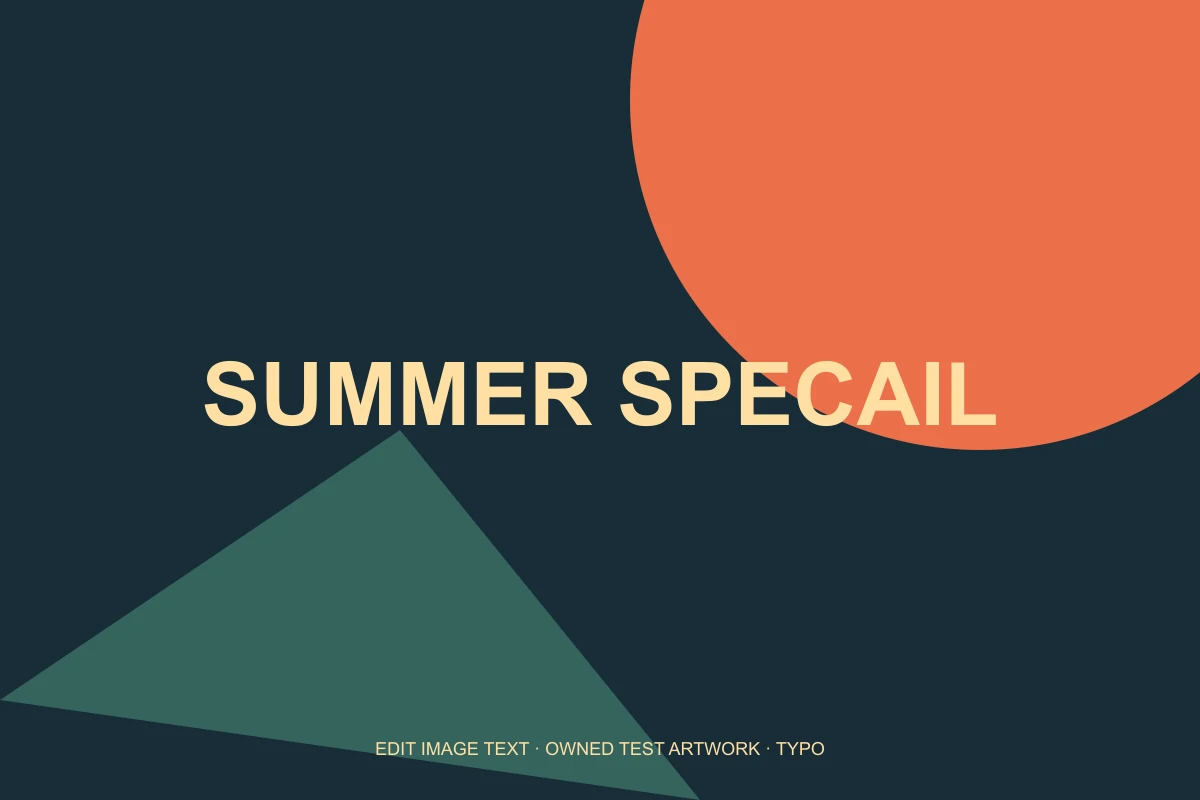
To fix a typo in an image after export, upload the clearest copy, enter the complete misspelled phrase and its correction, then check the generated lettering before downloading. A JPG, PNG or WebP contains pixels rather than an editable text layer. The editor attempts to redraw the words you identify; it does not proofread the whole picture.
If you still have the original design with editable text, fix the typo there and export again. The workflow below is for a finished image you own or have permission to edit, when that source file is unavailable. Open the image typo editor.
1. Keep the original and prepare one known correction
Use the best exported image available, rather than a screenshot of a screenshot. Save an untouched copy so you can compare the entire result with the original.
Decide the exact correction before using the editor. A model should not decide whether a price, date or product claim is correct. For a spelling mistake, check the intended word yourself; for a number, check the authoritative source for that value.
Start with a complete word or short phrase. Changing several unrelated lines makes it harder to tell which area was targeted and whether another mistake appeared. A longer replacement can also change wrapping or spacing, even if it contains the same number of characters.
2. Enter the typo exactly as printed
Sign in and upload a PNG, JPEG or WebP up to 10 MB. Choose Replace text. Enter the visible wording in Text in the image, and the verified correction in Change it to.
In our existing controlled test, the fields were:
- Text in the image:
SUMMER SPECAIL - Change it to:
SUMMER SPECIAL
Copy the original mistake instead of silently correcting it in the first field. Include capitals, spaces and punctuation. Do not enter only AI and IA: a pair of letters gives less context than the complete phrase.
This workflow does not require selecting an automatically detected text box or drawing a region. If the same phrase appears twice, the current editor may not reliably distinguish the occurrence you mean. More surrounding wording can help when it is unique; use the source design if you need precise control over identical repeated phrases.
3. Inspect an actual exported-image typo correction
The comparison below is an existing test on artwork we created, not a customer submission. It used Replace text with Nano Banana Pro at the 2K tier, with a 1200 × 800 PNG input. These are web-optimized 1200 × 800 previews of the original and composited result.
Before: SUMMER SPECAIL
After: SUMMER SPECIAL
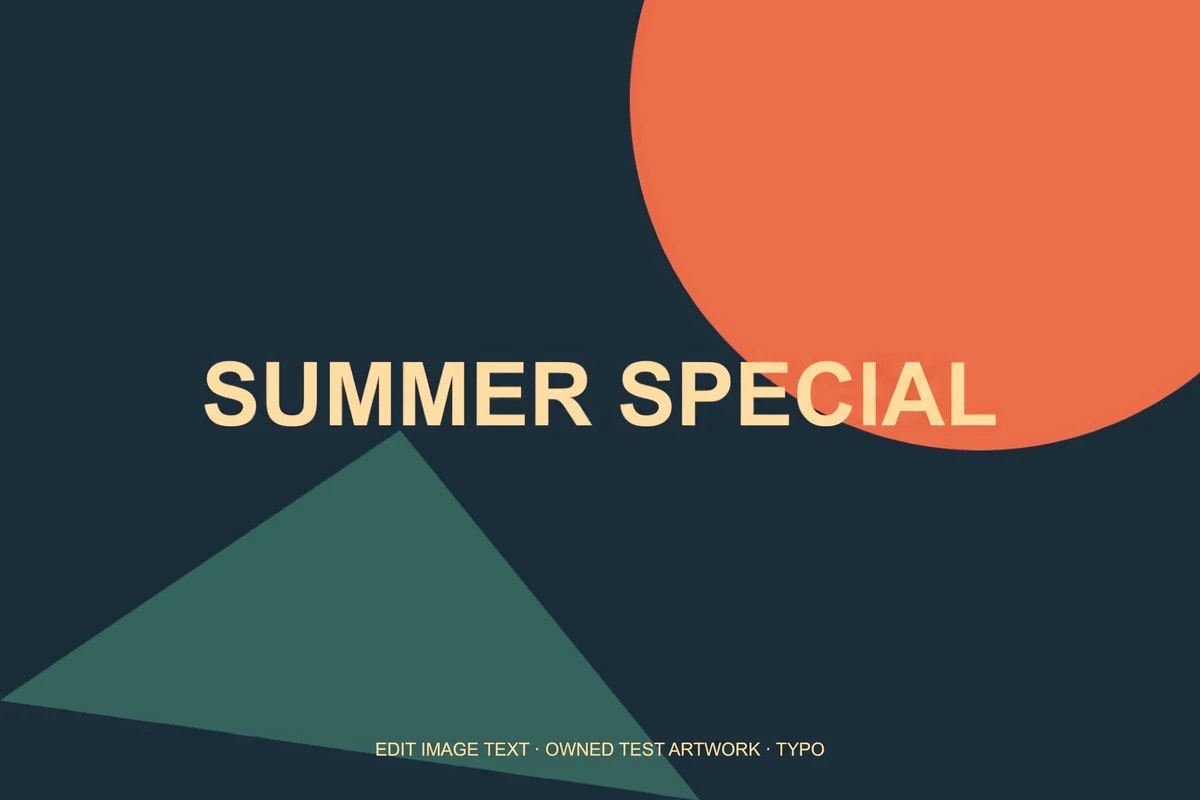
Existing controlled Pro 2K test: the requested correction is visible. The recorded model output was 2528 × 1686, with a 2.9% pixel-difference estimate. That estimate does not measure spelling accuracy or exact font matching. This single test does not establish performance on tiny text, repeated phrases or punctuation.
Read SPECIAL letter by letter, rather than accepting the familiar shape of the headline. Then compare its position, weight and spacing with the original. Look at the smaller footer text and the nearby colored shapes as well: a correct target word does not establish that everything else remained unchanged.
Inspect the published case, original input and unmodified model output. The historical Pro result is evidence for this particular request, not a promise that a new Fast or Pro request will produce an identical image.
4. Check letters, numbers and punctuation separately
The following are input-writing examples, not additional measured results:
- Misspelled word:
SUMMER SPECAIL→SUMMER SPECIAL. Verify the letter order and check for missing characters. - Known wrong digit in artwork:
ROOM 204→ROOM 240. Verify the complete number, not only the changed digits. - Missing punctuation:
LET'S EAT GRANDMA→LET'S EAT, GRANDMA. Check the comma, apostrophe and spacing.
For a digit or punctuation edit, supply the complete short phrase and check every rendered symbol. A plausible-looking 0 may be O; an apostrophe may disappear; a decimal point may be tiny. None of those errors can be ruled out by a successful generation message.
If the correction changes an event date, also verify the year, weekday and repeated dates elsewhere. Use the date-editing page for that workflow. For malformed words generated by AI, see the Fix AI text tool and the existing correction-versus-removal guide.
5. Compare the background before downloading
Check the whole image, the change highlight and a close-up of the letters. The editor can reuse the surrounding original when the differences are contained, but the surface hidden by the old letters still has to be estimated.
Look for halos, different-colored patches, broken lines and nearby wording that moved. The background-preservation page explains those checks; the same-font page explains why visually similar lettering is not proof of an identical font.
Download only a result you have reviewed. PNG avoids another lossy JPEG encoding step, while a smaller JPG export is available when browser processing supports it. Open the downloaded file, check its dimensions and inspect it at the size where you intend to use it.
Can the editor find every typo automatically?
No. You supply a known old phrase and its replacement. This is not a document spellchecker, grammar checker or whole-image OCR service. Tiny, blurred or unreadable letters may not provide enough visual information for a useful correction.
For dense paragraphs, strict brand typography or a design that needs several layout changes, return to the source artwork when possible. Correcting one short phrase is a more reviewable task than rewriting the entire image.
Can I fix an image typo for free?
New accounts get 1 free Fast edit at 1K after signing in, with no card required. One-time packs start at $3.90 for 8 edits and unlock Pro 2K. Each submitted edit uses 1 credit; purchased credits never expire. Check current pricing.
Fast and Pro output dimensions depend on the model and aspect ratio. A larger file does not recover detail absent from the original, and either mode still needs a spelling and background check.
Fix a typo in your own image, or follow the main editor operation guide if you need help with the controls.
Your image. A better choice of words.
Start with one short phrase, then review the lettering and background before you download.